Monthly and yearly totals
Weekly, monthly and yearly plans become one monthly figure and one yearly figure, so small charges stop hiding.
A reminder before each renewal
Get notified a few days before a subscription renews, while you can still cancel it.
Ask in plain words
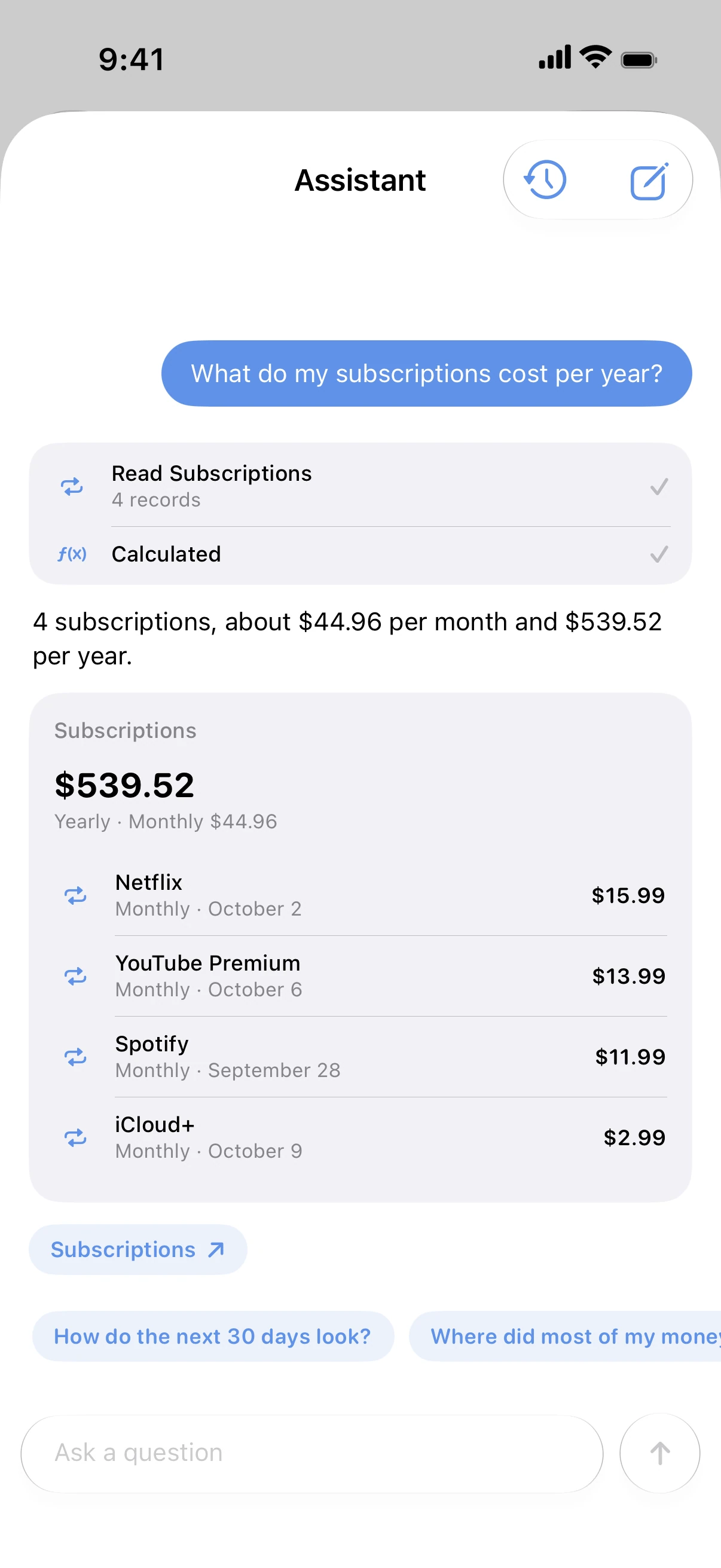
Ask Spendry's assistant what your subscriptions cost per year and get the total with every subscription listed.
Part of your whole budget
Subscriptions count toward your budgets and your upcoming payments, so you see them next to everything else.
How to track your subscriptions
- Add each subscription with its price, billing cycle and renewal date.
- Check the monthly and yearly totals.
- Turn on reminders before renewals.
- Cancel what you no longer use and watch the total drop.
Why it helps
- Subscriptions from any service, not only the App Store.
- No bank login needed: add each one once.
- A free subscription cost calculator on this site.
Free calculators
Subscription cost calculator
Free subscription calculator. List your subscriptions with their price and billing cycle and see what they cost each month, each year and over five years.
Monthly budget calculator
Free monthly budget calculator: split your take-home pay into needs, wants, and savings or debt payments in seconds. No sign-up.
Guides
How to track and cut your subscriptions
Find out what your subscriptions really cost each month and each year, get a reminder before every renewal and decide which ones to cancel.
How to never miss a bill payment
Set reminders for every bill, card and subscription so nothing is paid late. Get a notification before the due date and mark it paid in one tap.
Questions
Does Spendry find my subscriptions automatically?
No. It doesn't connect to your bank, so you add each subscription once. After that it tracks renewals and totals for you.
Can I track yearly subscriptions?
Yes. Weekly, monthly and yearly plans are all supported and shown as monthly and yearly totals.
Will it remind me before a subscription renews?
Yes, a few days before each renewal, even if you don't open the app.
How do I cancel a subscription on my iPhone?
App Store subscriptions are cancelled in the Settings app, under your name and Subscriptions. Other services are cancelled on their own website or app.